What's New

What we shipped, in plain English. New entries on each App Store release.

Since launch

Since April 14, 2026

When Jacked first shipped, the app could do one thing: hold a conversation with a coach while you logged a set. It does considerably more now. The full story is on the blog — What's new in Jacked since 1.0.

The highlights:

  • Workout Plans — build a program from a library of hundreds of exercises; the coach reads it and coaches each lift to its category.
  • Log after the fact — trained without the app? Type 4x8x225 and the coach files it.
  • Smarter progression — the coach reads your own rep history; no fixed rep range, no setup.
  • CSV export — full history download from Settings.
  • Logging that gets out of the way — no pauses, no double-logs, corrections update the chat card in place.

Build-by-build below.

May 23, 2026

Editable history, sharper coach

The History tab is now fully editable, corrections you make in chat propagate everywhere they should, and the coach got sharper about progression — including on bodyweight moves.

  • Tap any set in History to edit reps, weight, or equipment; "+ Add set" and "+ Add exercise" backfill what you missed; tap the date to change when the session ran.
  • New "+" button in History logs a workout you forgot, pre-filled to today.
  • Delete a set with one tap and a six-second Undo, no confirmation modal.
  • Correct a set in chat and the change lands in both the chat card and the History session card immediately.
  • Coach states the new weight when you've earned a bump, and gives a rep target after bodyweight sets instead of going quiet.
  • Rest-timer bell rings through a locked phone, mixes with your music, and stops double-dinging when you reopen the app.

May 21, 2026

A real editor for sets and session timing

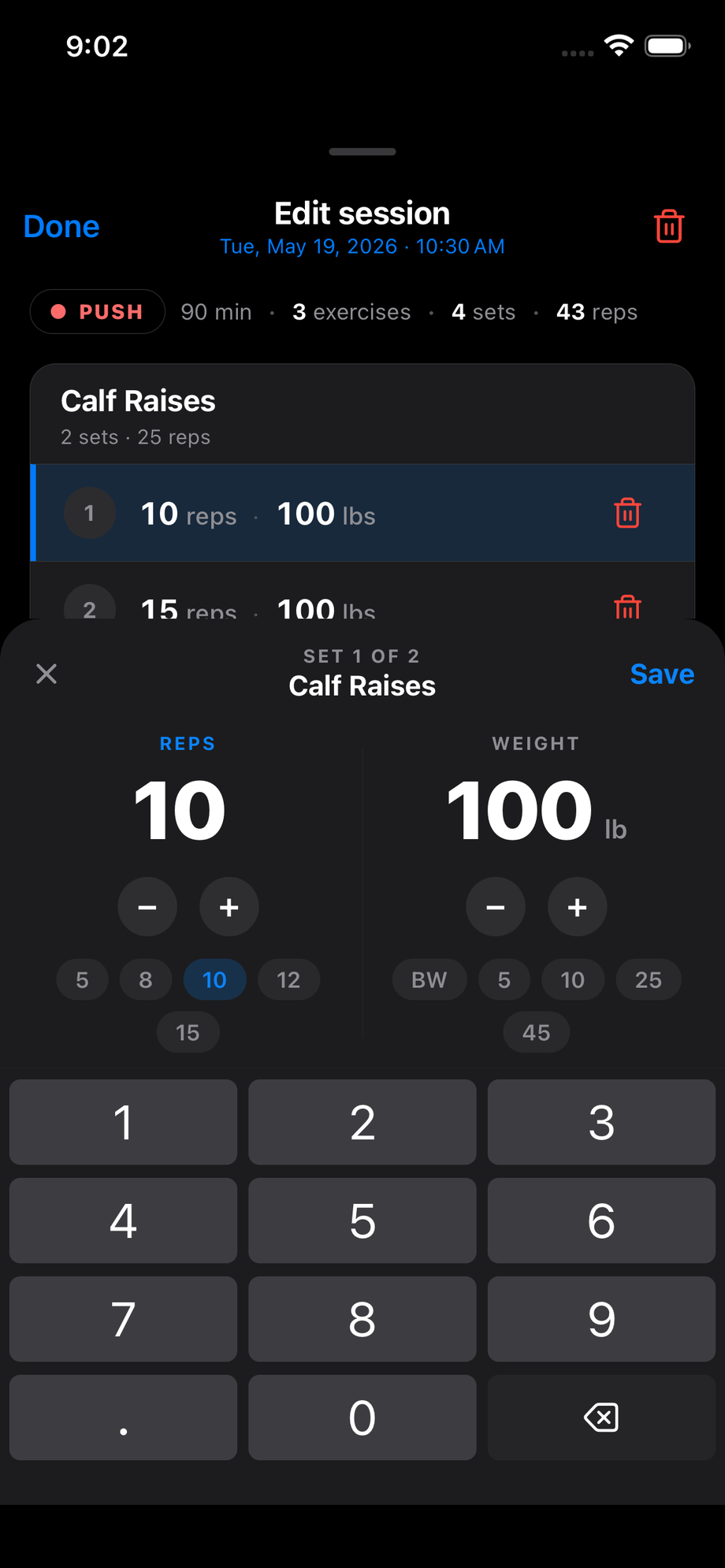
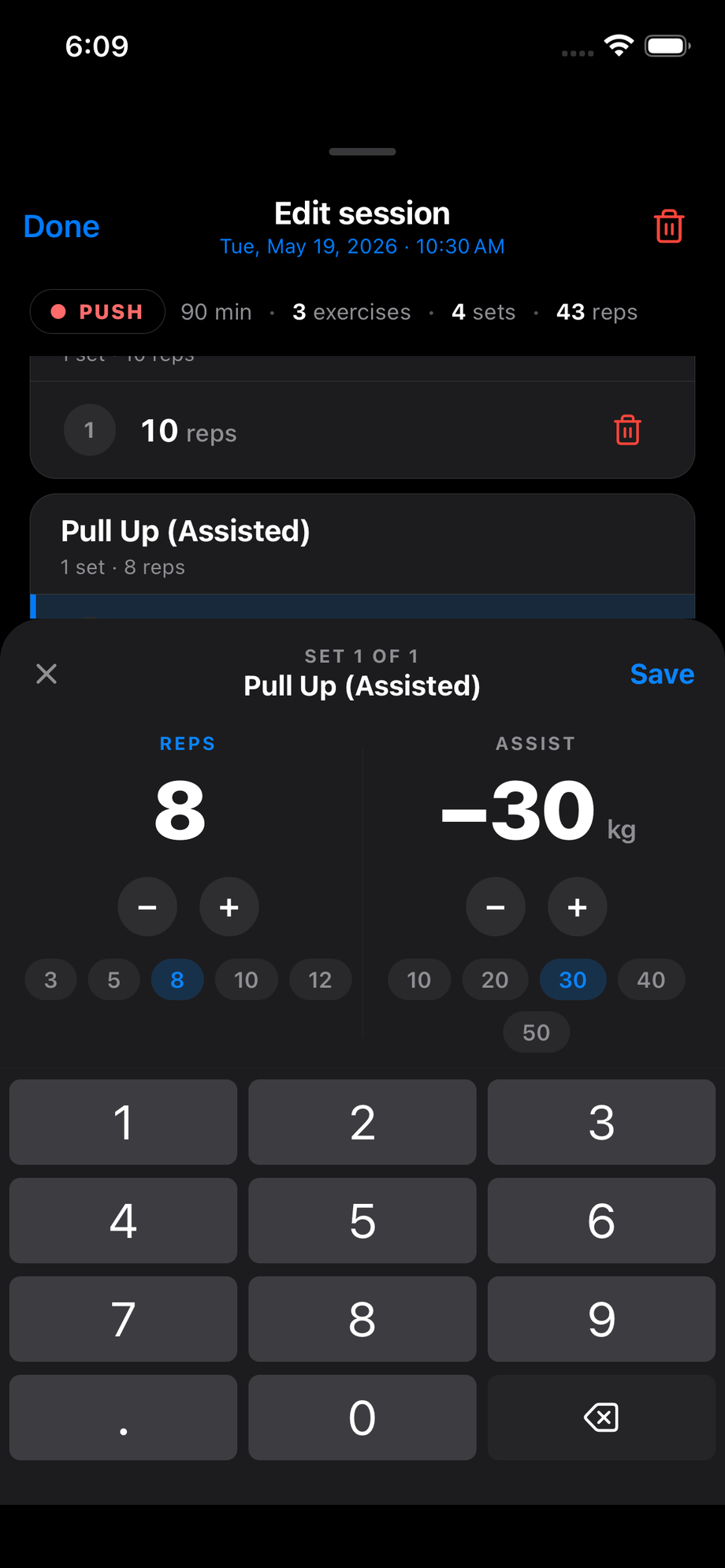
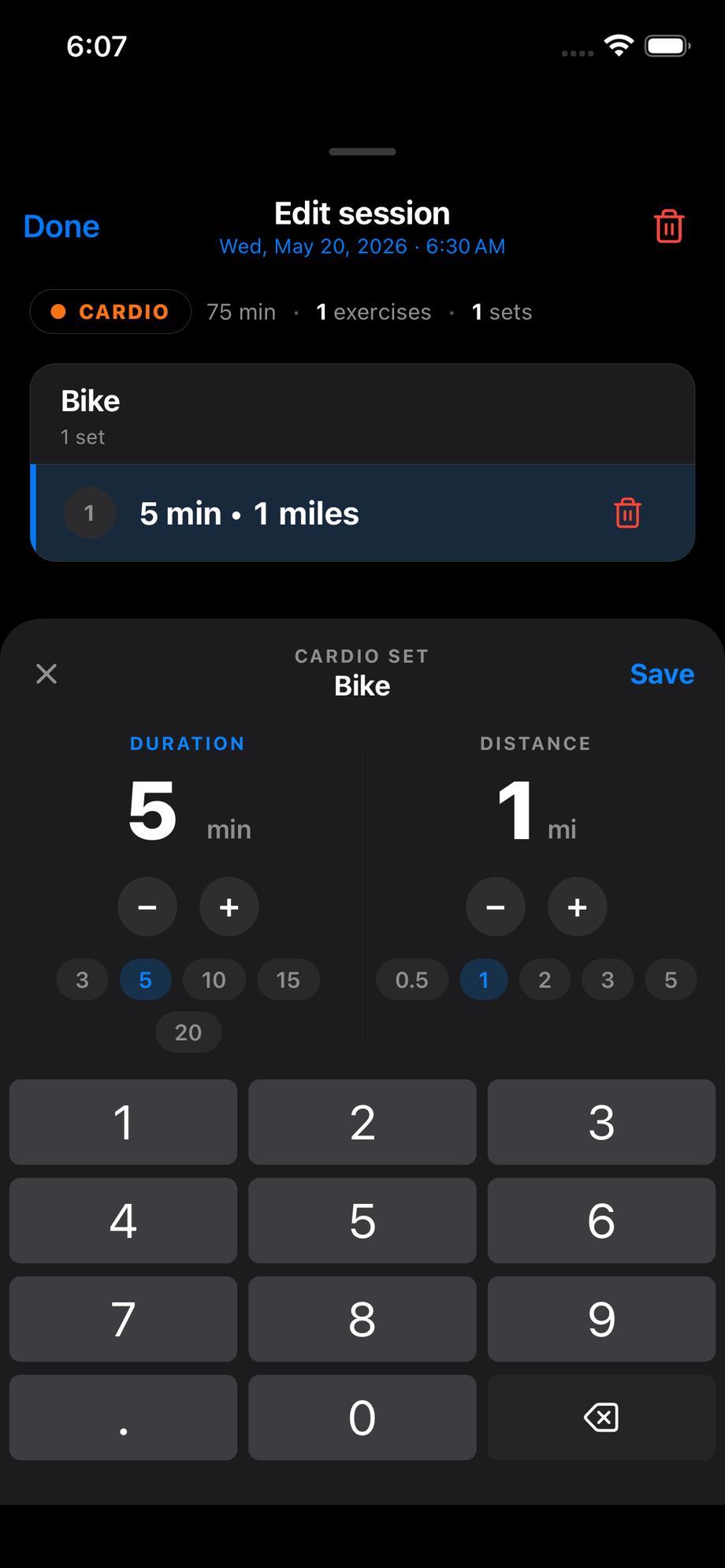
Tap a set in History and you get a proper editor — big number, small unit, ± stepper, preset chips, and a number pad that stays put.

Cardio set editor — duration and distanceStrength set editor — reps and weightAssisted set editor — reps and assist shown as a leading minus
  • One shell, five variants — strength, bodyweight, assisted, cardio, and session timing all share the same shape.
  • Reps and weight are huge and front-and-center, so you stop squinting between fields.
  • Preset chips for the values you actually use — 5 · 8 · 10 · 12 · 15 for strength reps, 3 · 5 · 10 · 15 · 20 minutes for cardio, etc.
  • Assisted moves show the assist as a leading minus (−30 lb) instead of hiding the sign in the data layer.
  • Editing when the session happened and how long it ran uses the same panel — picks for date and start time stack above a duration column.

May 14, 2026

Plans for everyone, and the coach pays closer attention

Workout Plans launches; the coach gets sharper at noticing what actually happened.

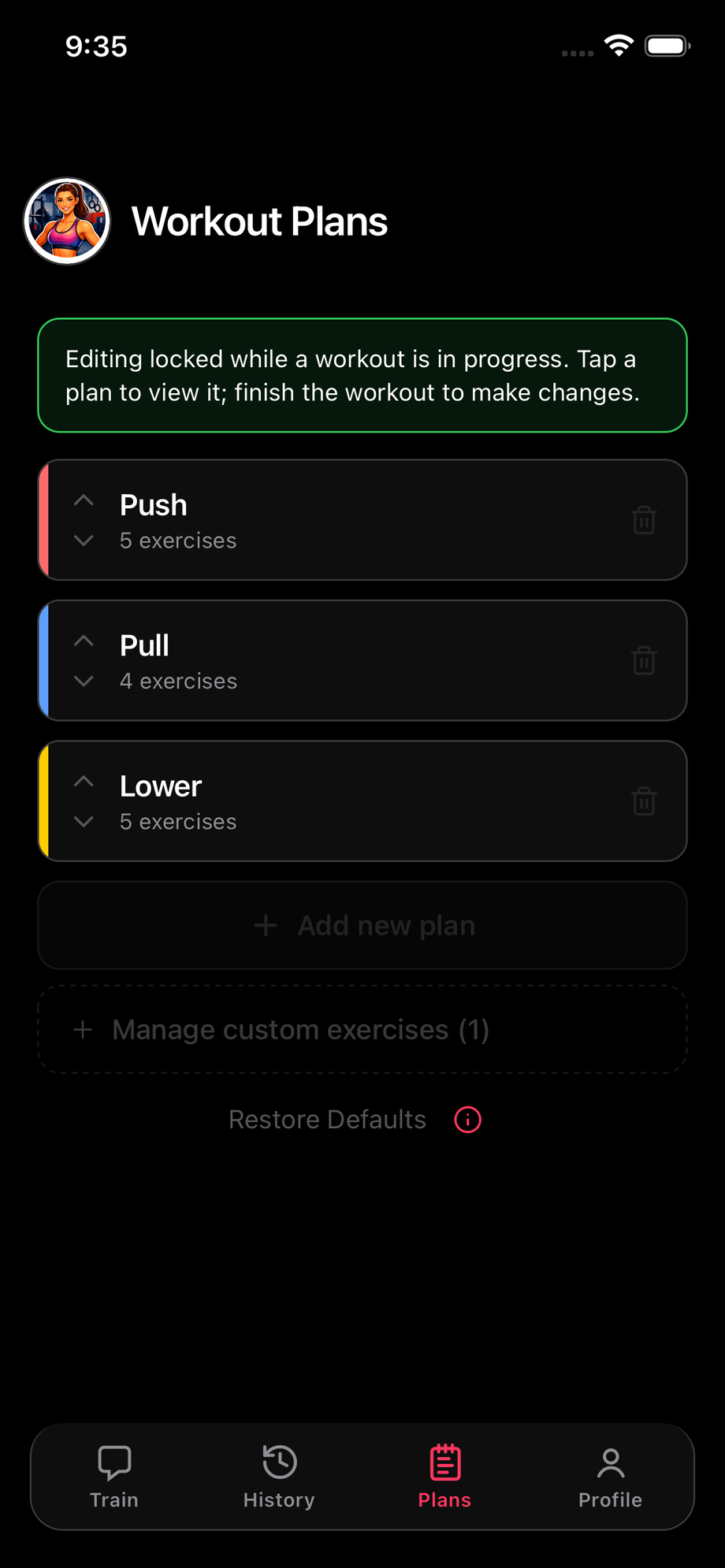
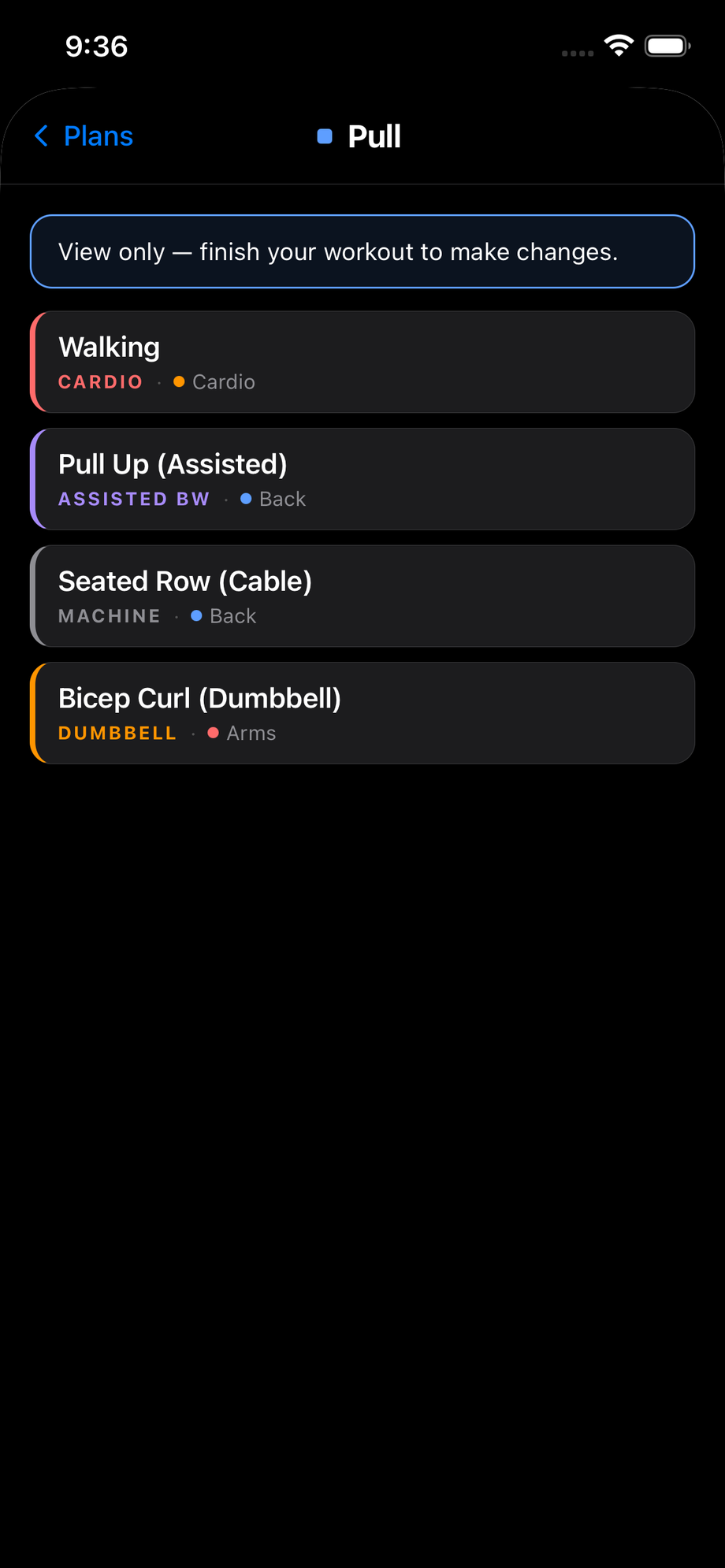
Workout Plans — your programs in one placeA plan's exercises, each tagged by category
  • Build your own program from a library of hundreds of exercises.
  • Edit a logged set in chat and the card updates in place.
  • Delete a set; the rest renumber to match History.
  • Coach flags skipped exercises at session close.
  • Sets log once and only once.

May 13, 2026

Export your data, sharper coach, cleaner Train

  • Export full workout history to CSV from Settings.
  • Coach previews each session up front and tracks progress against the plan.
  • Faster replies, no more double-logging.
  • Cardio corrections merge into the existing set instead of overwriting.
  • Visual pass on Train.

May 6, 2026

Plans get a real home

Dedicated Plans tab, real exercise library, plan-aware coach.

  • Hundreds of exercises, filterable by body part or category, smart search ("tricep p" → "Triceps Pushdown").
  • Custom exercises sync across devices.
  • Coach reads your plan from the first message and coaches each lift to its category.
  • Warmups tracked separately, so light primers won't trigger a false weight drop.
  • Off-plan exercises log normally — extra work counts.
  • History uses your workout-type colors.

May 2, 2026

Smarter coaching, sturdier sessions

  • Progression reads your actual rep history — no fixed rep range, no setup.
  • Type "2x10x70" mid-session and both sets log.
  • Sessions survive an app reload — chat, set cards, and plan come back intact.
  • Editing past workouts: full-height sheet with undo and a one-tap "Tell Coach".
  • jackedapp.ai/open links open the app directly, no Safari detour.
  • About You stores birth month + year (no day) so age stays accurate as you age.
Build history

Every TestFlight build with what changed. Newest at the top.

Build 135 v1.2.1 · May 22, 2026 #

Correcting a set in chat now updates that session in your History tab, not just the chat card.

Build 132 fixed the chat scrollback so a corrected set re-renders in place. The History tab had the same blind spot one level up: a session card only redrew when the number of sets or exercises changed, so a correction that swapped an exercise or changed reps, weight, notes, or equipment left the counts identical and the card kept showing the pre-correction values. The card now redraws whenever any value on it actually changes, so your chat and your history finally agree everywhere.

Also tightened up account handling: signing out now fully clears the previous account's in-memory workout plan and exercise data, and a program sync that fires mid-switch is blocked from writing to the wrong account. This only ever surfaced when switching accounts on one device, but it's the kind of bug that quietly corrupts data, so it's now closed off on both sides.

Build 134 v1.2.1 · May 21, 2026 #

Finish a set of bodyweight pull-ups or push-ups and the coach now gives you a rep target for next time instead of going quiet.

The coach's progression call only knew how to talk about weight. On a bodyweight exercise — pull-ups, push-ups, dips with no added load — it had no weight to suggest, so it just skipped the call and moved on to the next move with nothing. Knock out 5/5/4 bodyweight pull-ups now and the coach reads the same flat/descending/dropping patterns it always has, then states the next-session target on the reps axis: push for 6 next time, hold at 5, or back off — whichever the numbers say. No more silent advance, and no more nonsense "go up 5 lb" on a movement that doesn't have a weight.

Build 133 v1.2.1 · May 21, 2026 #

Telling the coach a set belonged to a different exercise now cleans up the wrong card and logs the right one in the same breath.

If you said "that last Bicep Curl was actually a Seated Row," the coach used to log the Seated Row but leave the bogus Bicep Curl card sitting in chat and in History. Now it deletes the misfiled set and logs the correction in one turn, and the chat thread drops the old card in place so the scrollback stays honest. Your session ends up with what you actually did, not what the coach misheard.

Build 132 v1.2.1 · May 21, 2026 #

Correcting a logged set in chat now updates the set card right there in the scrollback.

If you told the coach "that was bodyweight, not -30 lbs" and it corrected the set, the History tab picked up the new numbers but the card in the chat thread kept showing the old ones — reps, weight, equipment, all stale. The card now re-renders the moment the correction lands, so the conversation and your history agree.

Build 131 v1.2.1 · May 21, 2026 #

Cardio rows from your plan now always pick up the CARDIO eyebrow, even on the first set of a fresh session.

There was a race where logging the first set of a planned cardio exercise — "Walking," say — could land without the CARDIO eyebrow or body-part chip on the set card if the exercise library hadn't finished loading yet. The name was right, the duration and distance were right, but the row looked like a plain lift. The coach now pulls that metadata straight from your plan when the library isn't ready, so the eyebrow shows up reliably from the first set on.

Build 130 v1.2.1 · May 21, 2026 #

A big-numbers editor for sets and session timing — large value, small unit, a ± stepper, preset chips, and a number pad that stays put.

Tapping a set in History now opens a redesigned editor: the value you're changing is huge and front-and-center, with a small unit beside it, a ± stepper for one-at-a-time nudges, preset chips for common jumps, and a number pad that stays put instead of fighting you for screen space. Same shell handles every kind of set — strength with reps and weight, bodyweight with just reps, assisted moves (which now correctly show the assist as a leading minus), and cardio with duration and distance. Editing when the session happened and how long it ran uses the same panel, so it all feels like one thing.

Build 129 v1.2.1 · May 2026 #

The chat input is back to behaving, and cardio rows speak their own language again.

If your plan has "Walking" in it, the coach now logs your walk as "Walking" instead of "Walk" — so the cardio eyebrow shows up on the set card and the entry lines up with the plan. Off-plan stuff still logs freely under whatever name fits ("Burpees" doesn't get forced into the nearest plan match). Cardio set cards also now render distance with its unit — "0.5 mi" instead of a bare "0.5" — so the row stops looking like a half-set of something countable.

On the chat input: the send/play button is nudged up a few pixels so it sits at the text baseline instead of low, and the character counter is hidden until you cross 4000 characters. Below that it was just noise; from 4000 on you actually want the budget signal, with the orange warning still kicking in at 4750. When it does appear, it lives inside the bar above the button instead of floating in the gap above the input.

Build 128 v1.2.1 · May 2026 #

The set editor stops covering the row you're editing, deleting a set is one tap with an undo, and the coach stops fibbing about what's logged.

The History edit modal got another round. Tapping a set now slides up a panel from the bottom of the sheet while the list above it shrinks, so the row you're editing stays in view instead of being covered by a centered dialog. The row itself highlights so the panel's context is obvious, and the same panel handles editing when the session happened — opening one closes the other. The "· Set N" suffix in the panel title is gone, the row densities are tighter, and the first field actually focuses after the slide settles instead of racing it.

Deleting a set no longer pops a confirmation modal — tap the delete, the set goes, and an "Undo" toast hangs around for six seconds in case you didn't mean it. The toast button is bigger than it looks (extra hit slop) and labeled properly for VoiceOver.

On the coach side: if you ask "did it log?" or "log the walk?", the coach now checks the current session before answering instead of cheerfully claiming "Already logged, you're good" when it isn't. And if you fire off a self-contained report — "just walked 0.6 miles in 11 minutes" — that gets logged as a walk even when the active exercise is something else (lifts, mid-warmup, whatever). Previously those could fall through the cracks if the coach had just transitioned to a different movement.

One more History fix: legacy exercises logged before the category-snapshot work shipped now classify against the library, so duration-only moves like "Sauna Stretch" stop sprouting a phantom miles field, and older walks/runs keep both their duration and distance.
Build 127 v1.2.1 · May 2026 #

Saving a set edit now scrolls the row back into view.

When you save an edit in the History modal — especially "+ Add set," which lands the new row at the bottom of its exercise card — the row could end up below the fold if the sheet had been scrolled up. The list now scrolls to the saved row as the dialog closes, with a bit of breathing room above so it doesn't sit flush against the summary bar. Small thing, but you get to actually see the save land.

Build 126 v1.2.1 · May 2026 #

The set-edit dialog stops crowding the keyboard, and the coach stops occasionally double-logging your sets.

The dialog that opens when you tap a set was centering itself vertically, which left Save/Cancel pressed up against the top edge of the keyboard — fine for a weighted set with one input, cramped for a cardio set with two. It now anchors near the top of the sheet with a clear gap above the keyboard, and the first field focuses on open so you can start typing immediately.

Under the hood, the coach had a path where it could log a batch of sets without going through the scribe — which meant a set you'd already logged could quietly get re-logged a second time. That route is now properly closed.

Build 125 v1.2.1 · May 2026 #

Editing a set opens a proper sheet, and the sign-in screen finally plays nice with password managers.

The History edit modal's per-set editor used to swap the row into edit mode in place, which kept fighting the keyboard for space — the focused row could scroll out of view, and the fixes for that kept reintroducing the old double-inset problem. Tapping a set now opens a small dialog over the dim layer with the reps/weight fields and Save/Cancel buttons, sitting cleanly above the keyboard every time. The row stays in read mode and is fully tappable; "+ Add set" still appends an empty set and opens the same dialog.

On the auth screen, the email and password fields now advertise themselves properly to 1Password, iCloud Keychain, and the rest, so autofill suggestions actually show up. "Forgot Password?" moved out from under the email field to under the Sign In button where you'd expect it. The chat input font is also back to 16pt after a stray tweak nudged it down a couple of points earlier in this cycle.

Build 124 v1.2.1 · May 2026 #

The edit modal does its job inline, and the coach stops being coy about weight bumps.

The History edit modal got another round of polish. Typing into a reps or weight field now replaces what's there instead of appending — type "20" on a "15" and you get 20, not 1520. The add-exercise picker grows a "From your plans" section at the top, so a movement you already programmed is one tap away instead of buried in Library. The edit-timing dialog goes back to tap-outside-cancels (so a stray tap mid-spin doesn't commit a wrong date), and the date picker is finally legible on the dark sheet. The sheet itself stops overshooting when the keyboard comes up on short modals.

Since the editor can now fix anything you'd want to fix, the "Tell coach about this" affordances are gone — no more tip bar, per-exercise pill, or action-sheet item routing you back into chat to describe a logging mistake you could just correct in place.

On the coach side: after a session where you hit your reps flat, it now actually states the new weight it's bumping you to instead of saying "nice work, 3x10 — moving to next" and leaving you to guess. And if your set reps weren't flat — say 10/9/9 — it reports them verbatim instead of rounding to "3x10".

Build 123 v1.2.1 · May 2026 #

Editing a single-set workout no longer hides the row behind the keyboard.

When the edit-session sheet only had one set in it, tapping the reps or weight field used to scroll the row clean off the top of the screen — two different keyboard-avoidance mechanisms were both lifting the content, so the row overshot into nowhere. The sheet still rises above the keyboard, but the inner list no longer double-pushes, so the focused row stays put whether you're editing one set or twenty.

Build 122 v1.2.1 · May 2026 #

No more double-ding, and bodyweight moves stop pretending they need weight.

Two paths could chime the rest-timer bell at the same time. If you were watching the screen when rest ended, the lock-screen banner was carrying audio on top of the in-app chime — that banner now shows silently in the foreground so only the in-app sound plays. And if you briefly tapped back into the app within a few seconds of a backgrounded ding, the in-app timer used to fire a follow-up chime; it now knows that notifee already handled the audio and stays quiet.

Push-ups, ab wheel, bird dog, and other bodyweight moves no longer render a weight column in the editor or read view — they're reps-only now, which is what they always should have been. Cardio-only sessions stop showing a misleading "1 reps" or "0 reps" on the session card, since legacy walks were quietly logged with a single rep. The reps stat just disappears when there's nothing meaningful to count.

Build 121 v1.2.1 · May 2026 #

Log a workout you forgot, fix when it happened, and a bigger chat input.

The History tab gets a "+" button for logging a past workout — pick the type, the edit modal opens pre-filled with today's date and 60 minutes, and you fill in the rest. Tapping the date on any session now lets you change when it actually started and how long it ran. Cardio rows show their unit ("2 miles", "0.5 miles") instead of a bare number, and older walks, runs, and bikes that were locked to duration-only can finally have distance edited too.

The edit modal itself got a round of polish: tap outside the sheet to dismiss when you haven't changed anything, "+ Add set" starts blank instead of pre-filling your last set's reps and weight, and single-digit reps line up with double-digit ones so the column stops jittering between rows. A sync bug is also gone — edits and deletes made from History no longer get clobbered when the in-progress session finishes.

In the Train tab, the chat input now holds up to three lines before scrolling inside itself, so longer messages don't get their descenders clipped at the bottom of the pill.

Build 120 v1.2.1 · May 2026 #

No double-ding when you come back to a finished rest.

If you backgrounded the app mid-rest, the lock-screen notification already fired when the timer hit zero — but reopening the app would chime a second time as the in-app timer caught up. The in-app chime now only fires for rests that ended within the last few seconds, so a stale timer stays quiet. The haptic still pulses when you return, so you get the tactile cue without the redundant audio.

Build 119 v1.2.1 · May 2026 #

The rest-timer bell rings through a locked phone, and it stops pausing your music.

The bell now fires as a local notification when the app isn't in front, so you'll hear it whether the phone is locked, in your pocket, or you've swiped over to Spotify. While the app is foregrounded, audio playback now mixes with whatever else is playing instead of taking over the audio session — your music keeps going, the chime layers on top.

If you're in early access, past sessions are now editable from History: tap a set to inline-edit, "+ Add set" to append one prefilled from your last, or "+ Add exercise" to attach a movement you forgot to log. A nagging sync bug is also fixed — deleting a custom exercise or plan entry no longer resurrects it on the next launch. Small polish: the keyboard now dismisses when you drag the chat list or the exercise picker, and the plans editor lets you save a plan with as few as one exercise.

Build 118 v1.2.0 · May 2026 #

The rest-timer bell rings on time, every time.

The boxing-bell sound is now loaded into memory the moment the app starts, so the first ding of a session fires the instant your rest ends instead of after a brief lag while the file decoded. Subsequent rings were already snappy — this brings the first one in line.

Build 117 v1.2.0 · May 2026 #

Maintenance build.

No user-visible changes this round — a republish on top of build 116 with the same feature set.

Build 116 v1.2.0 · May 2026 #

A boxing bell when your rest ends, and set cards that show what they are.

If you're in early access, there's a new Rest Timer Bell toggle in Settings — flip it on and the rest period ends with a quick boxing-bell ding so you don't have to keep glancing at the phone. Toggling it on plays a preview right then, which doubles as a check that your device isn't on silent.

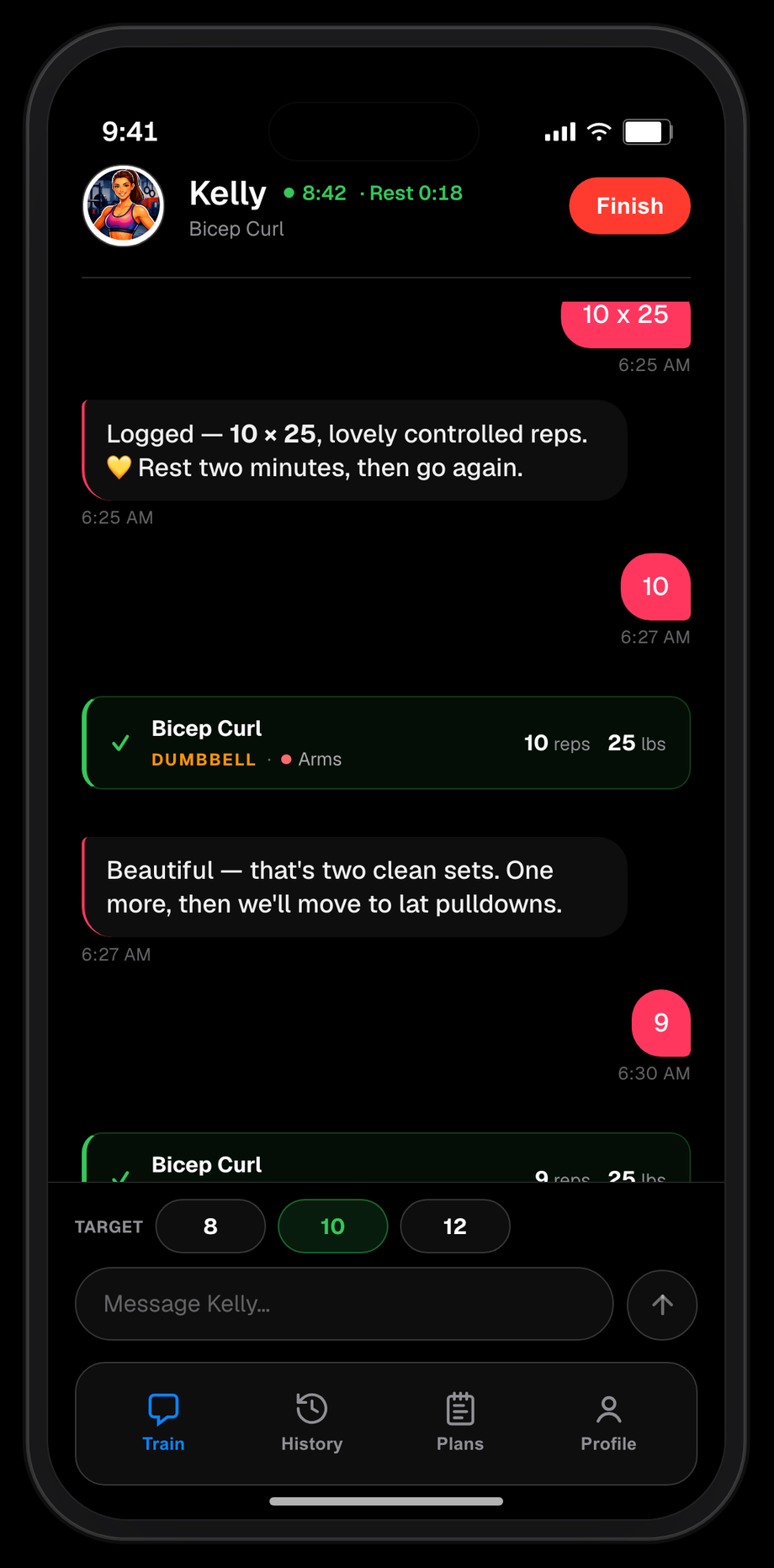
Logged set cards now carry a small metadata strip — a colored category eyebrow (DUMBBELL, REPS ONLY, DURATION, etc.) plus body-part dot chips — matching the look of the plans editor, so a glance at the card tells you what kind of movement it was.

The coach stops asking how long you want to do cardio up front; it now proposes a specific duration based on what you've done in recent sessions instead of making you commit before the warmup. The silent scribe got a bulk-log tool so a quick "did 5x5 at 185, then 3x10 at 135" files in one shot instead of one call per set, and references to internal tools and agents no longer slip into the coach's replies.

Build 115 v1.2.0 · May 2026 #

The coach notices what you skipped, and the scribe stops double-logging follow-up sets.

If your plan had four exercises and you only got through two before wrapping, the coach now flags the un-started ones at session close instead of letting them slip by quietly. The silent scribe got another duplicate-log fix — it was occasionally re-logging follow-up sets in the same exercise; now it sees full session state and only files each set once. Small UI polish: the coach avatar is the same size across Train, History, Plans, and Settings.

Build 114 v1.2.0 · May 2026 #

Plans is out of early access — everyone gets it.

Workout plans are now available to all users, not just the early-access group. The Plans tab is on by default and the old "Enable Plans (Preview)" toggle has been removed from Settings since there's nothing left to toggle. The version bump to 1.2.0 marks the milestone — Plans has graduated from preview to a first-class part of the app.

Under the hood, the silent scribe got another sharpening: a prod failure where it would tag a bare rep against the wrong exercise mid-multi-set is fixed by a tighter prompt that keeps it locked onto the active exercise.

Build 113 v1.1.6 · May 2026 #

Maintenance build.

No user-visible changes this round — just behind-the-scenes work on the scribe's test harness and prod transcript capture so we can keep tuning it from real sessions.

Build 112 v1.1.6 · May 2026 #

Corrections actually stick, and the silent scribe is now on for everyone.

If you fixed a set after logging it ("actually that was 185, not 175"), the History tab updated but the set card in chat kept showing the old number — so the chat looked like it had ignored you. The card now updates in place when you correct or delete a set, with a small edited indicator so you can see the change took. Deleting a set also renumbers the cards after it so the indices match what History shows.

The background scribe — the silent logging agent introduced a few builds back — is now running for everyone, not just early access. Alongside that, it got noticeably sharper: it stops misreading a correction as a brand-new set, ignores meta-talk like "remind me when I'm done" or "stop logging" instead of trying to file it as a workout, and does a better job telling who said what in a fast-moving exchange.

Build 111 v1.1.6 · May 2026 #

Train got a visual tune-up.

The chat surface now follows the latest design system: user and coach bubbles share the same shape and padding, with a thin colored stripe down the left side carrying each side's identity color instead of filling the whole bubble. Set cards got the same treatment — one consistent style with a green left rail and a simple ✓, whether you're in a real session or the welcome demo.

The input bar is clearer about state too: a play button when you're ready to start, a dimmed send icon when the input is empty, and a bright send arrow once you start typing. The Start Session button picks up your coach's accent color (orange for Biff, yellow for Kelly), and the bottom tab bar now tints to match your coach as well.

Build 110 v1.1.6 · May 2026 #

The scribe stops double-logging your sets.

If you rattled off a few sets in quick succession, the background logging agent would sometimes re-log sets it had already saved — it was seeing old messages and didn't know what was already recorded. That's fixed: the scribe now only looks at the most recent exchange and knows exactly which sets exist, so each rep report is logged once and only once.

Build 109 v1.1.6 · May 2026 #

You can export your data, and the coach actually knows the plan.

There's a new "Export History" option in Settings that dumps your entire workout history to a CSV file — exercises, sets, weights, units, and all. Share it, graph it, back it up, whatever you want.

The coach now opens each session with a quick preview of what's on deck ("4 sets of bench, 3 sets of rows…") and tracks your progress against those targets as you go, so it knows when you've hit your planned volume and when there's more to do. The preview is concise — just exercises and set counts, no weight chatter.

A handful of miscategorized exercises in the library have been corrected, and the first-time experience got a pass to make Train, History, Plans, and Profile each feel useful from the jump instead of mostly empty.

Build 107 v1.1.5 · May 2026 #

Plans is easier to find, and the session subtitle stops lying.

If you're in the early-access group, Plans is now surfaced where you'd actually look for it: a hint on the first-time welcome card, and a clearer cog on the "Choose Workout" modal so you can jump straight into the editor. The default Push/Pull/Lower template now has a small info icon next to Reset to Default that explains the thinking behind it — compound lifts, recovery between workouts, progressive overload — for anyone curious about the shape of their starter plan.

Bug fix: when you started a session on a custom workout type (say, "Ben"), the subtitle on the session card sometimes read "Lower day" or whatever the next-up suggestion was, even though the coach was correctly working on Ben. It now reads the workout you're actually in.

Build 106 v1.1.5 · May 2026 #

The coach stops logging sets — a silent scribe takes over.

Logging now runs in parallel as its own background agent, so the coach can focus on talking instead of juggling tool calls. The set chip appears right after the coach's reply, and you won't see double-logs or stray recaps of what was just logged.

Cardio is cleaner too: the coach won't invent a distance or duration when you only give it one, and a correction now merges into the existing set instead of overwriting it (so fixing the weight doesn't wipe the duration).

Plans got a rename action via a bottom sheet, with a heads-up if the change would affect your history. Sync is sturdier — your program won't get clobbered on login, pending uploads retry with backoff, and anything queued while offline replays on reconnect. Smaller polish: empty plans are skipped when recommending the next workout, the coach won't keep nagging you to tap Finish after you already did, and new users get a refreshed Push/Pull/Lower seed.

Build 104 v1.1.4 · May 2026 #

Maintenance build.

No user-visible changes in the app this round — just minor under-the-hood cleanup.

Build 103 v1.1.4 · May 2026 #

Coach only logs a set when you report one.

Follow-up to last build's bootstrap fix: the trigger to log a set is now strictly *your* last message, not anything the coach itself said. So if the coach recaps "nice, that's three sets of squats" or otherwise narrates back to you, it won't double-log — only your own reports count.

Build 102 v1.1.3 · May 2026 #

Workout Plans, properly: build a program from a real exercise library.

Plans now has its own tab, with a structured editor instead of a chat builder — pick exercises from a Strong-based library of hundreds of moves, filter by body part or category, and build out your week directly. Search is smarter too: typing "tricep p" finds "Triceps Pushdown", and results are ranked by relevance instead of alphabetical. You can add and edit your own custom exercises, and they sync across devices automatically. While a session is live the plan editor goes view-only so a mid-workout edit can't confuse the coach — finish the session, then edit.

The coach got a few fixes: it can now delete a set if it logs the wrong one, it knows which category each plan exercise is (so it coaches a Lat Pulldown like a pulldown, not a generic lift), and it won't auto-log a "walk" on the very first message of a session anymore.

Build 101 v1.1.2 · May 2026 #

Workout Plans preview is back to early access only.

The "Workout Plans (preview)" toggle in Profile → About You is gated to early-access testers again while we keep iterating on it. If you don't have early access, the toggle won't appear — your existing workouts and coaching are unaffected.

Build 100 v1.1.2 · May 2026 #

The coach logs everything and stops mistaking warmups for working sets.

If you report an exercise that isn't on today's plan, the coach now just logs it and moves on instead of pushing back — extra work and substitutions count. Warmup sets are also kept separate from working sets when the coach decides whether to bump weight, hold, or drop, so a few light primer sets at the top of a session won't get read as a collapse and trigger a false drop. Recaps split warmups out from working sets too, so the volume you actually did is easier to see.

Build 99 v1.1.2 · May 2026 #

Workout Plans preview is open to everyone.

The "Workout Plans (preview)" toggle in Profile → About You is no longer gated to early-access testers — anyone signed in can flip it on and start building custom training programs. The feature itself is still opt-in, so nothing changes if you don't turn it on.

Build 98 v1.1.2 · May 2026 #

History in your colors, and the coach knows your plan.

If you've set up custom workout types, History now uses your colors for both the chips on each card and a tinted card background that matches — much easier to scan at a glance. The coach also reads your active workout plan from the first message of a session, so it knows your program without you having to spell it out. Plan editing is now locked while a session is live, so a mid-workout edit can't confuse the coach — finish the session, then edit.

Build 97 v1.1.2 · May 2026 #

Maintenance build.

No user-visible changes in the app this round — just minor under-the-hood cleanup.

Build 96 v1.1.2 · May 2026 #

Maintenance build.

No user-visible changes in the app this round — just minor under-the-hood cleanup.

Build 95 v1.1.2 · May 2026 #

Tap a Jacked link, land in the app.

Links to jackedapp.ai/open now open the Jacked app directly if you have it installed, instead of bouncing through Safari. If the app isn't installed (or you're on Android or desktop), the same link falls back to a friendly page with an App Store button. The rest of this build is behind-the-scenes infrastructure — staging environment cleanup and email-template fixes — none of it user-visible.

Build 94 v1.1.2 · May 2026 #

Shorthand-logging fix.

Typing shorthand like "2x10x70" mid-session was only logging one set instead of two — the coach now correctly logs every set when you use that format.

Build 91 v1.1.0 · May 2026 #

Redesigned History edit, smarter progression, and a cleaner About You.

Editing a past session now opens a full-height sheet that matches the redesign — a workout summary up top, cleaner exercise and set rows, an overflow menu in the header (where Delete Workout now lives), and an Undo toast if you remove a set by mistake. On an active session, each exercise has a "Tell Coach" shortcut that hops over to chat with the exercise pre-mentioned. Progression coaching no longer assumes you train in a fixed rep range — it now reads your own history to decide bump, hold, or drop, so a flat 6/6/6 or 12/12/12 both register as "weight's too easy" without any setup. The About You sheet was rebuilt: weight and height share a row, height shows ft/in inline, and age is now stored as birth month + year (we don't ask for the day) so it stays accurate as you get older.

Also fixed: plan names like "Pull" now render the correct color in History instead of grey, the onboarding X button no longer clips the status bar, and returning users aren't blocked on the "How did you hear about us?" screen.

Build 90 v1.1.0 · April 2026 #

Smarter rotation with custom plans, and onboarding polish.

If you've turned on custom workout programs, the coach now recommends your next session in the order you set — instead of falling back to the default push/pull/lower rotation. Modal sheets are fully opaque again (the translucent look was letting the wrong things bleed through), while chat cards stay translucent as designed. Onboarding's "How did you hear about us?" picker also got proper social icons, an App Store option, and tighter card spacing.

Build 89 v1.1.0 · April 2026 #

Sessions survive app reloads, plus a new onboarding question.

If iOS reloaded the app mid-workout, your conversation with the coach used to reset — now the full chat history comes back exactly where you left it, alongside the set cards and plan exercises that already persisted. Plan exercises now restore for everyone on reload, not just users on the preview flag. Onboarding also adds a quick "How did you hear about us?" picker so we can learn what's working.

Build 88 v1.1.0 · April 2026 #

Shorthand logging and smarter offline catch-up.

Type "4x8x225" and the coach now logs four sets of 8 at 225 without asking what you meant — standard shorthand just works. If you trained offline or logged somewhere else, you can now dump your whole workout at once and the coach logs everything immediately, then gives you a quick summary instead of checking in set by set. Also fixed: set cards were disappearing when iOS backgrounded and restarted the app mid-session — they now survive the restore correctly.

Build 87 v1.1.0 · April 2026 #

Smarter progression coaching and Workout Plans polish.

The coach now tracks your progression data and calls out weight increases at exactly the right moment — when you've nailed the rep target, it tells you to add weight next set. It's also less verbose about it: one sentence, no lectures. Your workout plan exercises are seeded into the session from the start, so the coach knows your program before you say a word. History now labels each session with the plan name, and the plan editor was upgraded to use the same input bar as the main chat.

Also fixed: autocorrect swapping text after you tapped Send, and a workout picker label that was getting clipped.

Build 86 v1.0.4 · April 2026 #

Onboarding layout fix for smaller phones.

The onboarding screens were overflowing on compact devices like the iPhone SE and iPhone 14. Fixed — everything fits cleanly regardless of screen size.

Build 85 v1.0.4 · April 2026 #

Build your own workout programs.

Workout Plans is now available as a preview — enable it in Profile → About You to get started. You can create and manage custom training programs, and each plan has its own coach you can chat with to add, swap, or remove exercises. Your session coach also now knows about your plans, so it can reference them while you're mid-workout. A handful of plan-editor fixes landed too: the exercise list stays visible while you edit, auto-scroll no longer fights you during streaming replies, and the coach handles edge cases (like removing an exercise that's already gone) gracefully.

Build 84 v1.0.4 · April 2026 #

Onboarding refinements.

The new onboarding screens got a second pass to lock in the details — a close button in the top-right so you can skip at any point, a back link under each CTA so it's easy to step back, and type and button copy tightened up to match the final design.

Build 83 v1.0.4 · April 2026 #

New onboarding and a livelier splash screen.

The onboarding flow has been fully redesigned — four screens that show the real app UI so you know exactly what you're getting before you start. The splash screen now has a sparkle pop animation as the wordmark and tagline come in. Copy and type details throughout onboarding have also been tightened up to match the final design.

Build 82 v1.0.4 · April 2026 #

Chat input bar touchup.

The send button, play button, and input pill at the bottom of the chat screen now match the design exactly — correct sizes, colors, and borders. Nothing functionally changed, just looks crisper.

Build 81 v1.0.4 · April 2026 #

Visual polish across Train, History, and Profile.

The Train, History, and Profile tabs have been pixel-matched to the latest design — tighter spacing, better alignment, and cleaner type across all three screens. Also fixed a cosmetic glitch where a blank message bubble would briefly appear in the chat after you sent a message.

Build 79 v1.0.4 · April 2026 #

Rest timer now taps your shoulder.

When a set is logged, Jacked schedules a local notification so you know when rest is up — even if the app is in the background. You'll be asked for notification permission once after onboarding. Onboarding itself has been fixed so it only shows on your very first launch, not every time you open the app.

Build 77 v1.0.4 · April 2026 #

Stability update.

No new features in this build — same as build 76. Version bump for App Store submission.

Build 76 v1.0.3 · April 2026 #

History filters, sharper icons, and a cleaner splash.

The History tab now has filter chips so you can quickly narrow to Push, Pull, or Lower sessions. The workout picker shows which type you last did and flags any session that's still in progress. Icons across the app are now crisp vector graphics instead of PNGs — noticeably cleaner on all screen sizes. The splash screen wordmark got a few polish fixes too.

Build 74 v1.0.3 · April 2026 #

Milestones, a faster coach, and smarter routine prompts.

Your all-time personal records are now front and center in milestones, with a new goal sequence and a View All sheet to scroll through everything you've hit. The coach is noticeably faster to respond. The routine prompt now shows up at the right time — when you first try a new workout type, not during setup.

Build 73 v1.0.3 · April 2026 #

Milestones, a faster coach, and smarter routine prompts.

All-time personal records are now highlighted in milestones, with a refreshed goal sequence and a View All sheet to browse your history. The coach responds faster. The routine prompt now surfaces at the right moment — the first time you try a new workout type, not during initial setup.

Build 72 v1.0.3 · April 2026 #

Milestones, a faster coach, and smarter routine prompts.

All-time personal records are now front and center in milestones, with a fresh goal sequence and a View All sheet to browse everything you've hit. Coach replies are noticeably faster. The routine prompt now appears at exactly the right moment — the first time you try a new workout type, not during initial setup.

Build 71 v1.0.3 · April 2026 #

Milestones, a faster coach, and smarter routine prompts.

The milestones section now shows all-time personal records with a fresh goal sequence and a View All sheet to browse everything you've hit. Coach replies are noticeably faster. The routine prompt appears at the right moment — the first time you try a new workout type, not during initial setup.

Build 69 v1.0.2 · April 2026 #

Smarter routine prompts.

The first time you try a new workout type, the coach now asks if you already have a routine for that specific session — so if you've got a Push Day program, it offers to use it right when it's relevant. The generic routine tip that appeared during initial setup has been removed.

Build 67 v1.0.2 · April 2026 #

Milestones and a faster coach.

The milestones section has been reworked — it now shows all-time personal records, a fresh goal sequence, and a View All sheet so you can browse everything you've hit. Coach replies are noticeably faster.

Build 66 v1.0.2 · April 2026 #

Spacing polish.

A bit more breathing room between the chat input and the keyboard on all devices. History workout cards also have slightly better spacing so they're easier to scan.

Build 65 v1.0.2 · April 2026 #

Edit and delete from history.

You can now tap into any logged workout and edit or delete individual sets, or remove the whole session if needed. Coach chat got a visual refresh — fonts are sharper and the coach's message bubbles now use a color that matches their coaching style. Login sessions are stored in the iOS Keychain so you stay signed in more reliably across app updates.

Build 63 v1.0.2 · April 2026 #

Chat input polish.

The input bar now collapses and clears automatically when a session ends, so it's out of the way until you need it again. You can also type your next message while the coach is still responding — no more waiting. A bit more breathing room was added between the input bar and the keyboard.

Build 62 v1.0.2 · April 2026 #

Keyboard fix.

Fixed a gap between the chat input bar and the keyboard on real devices — the input now sits flush against the keyboard as intended.

Build 61 v1.0.2 · April 2026 #

Password reset, security hardening, and Rate the App.

Reset password flow now has correct labels and no longer shows confusing Cognito error messages. Sign-in no longer reveals whether an email is registered. Rate the App in Settings is now wired up. Dev settings panel is accessible by tapping the staging banner.

Build 59 v1.0.2 · April 2026 #

Account switching and input polish.

Toggling between staging and production now fully swaps your account — profile, history, and conversation all switch. Chat input is capped at three lines so it doesn't take over the screen.

Build 58 v1.0.2 · April 2026 #

A play button.

A play button in the chat input lets you start a new workout session without reaching for the header. New users are reminded they can paste an existing routine to get started.

Build 57 v1.0.2 · April 2026 #

Staging indicator and floating tab bar.

A banner appears when the staging API is active so it's always clear which environment you're on. The tab bar now floats above the content. Also fixed a bug where warmup sets were sometimes auto-logged before you confirmed them.

Build 56 v1.0.2 · April 2026 #

Welcome email and website performance.

New users now receive a welcome email after signing up. The website was overhauled — fonts, images, and layout are all faster and sharper. No app behavior changes.

Build 51 v1.0.2 · April 2026 #

Removed beta mode.

The beta escape hatch for access control has been retired. Access is now fully controlled by your subscription. No visible changes if you're a subscriber.

Build 50 v1.0.2 · April 2026 #

Coach identity is live for everyone.

The redesigned coach chat experience — new bubble styles, session header, and refined typography — is now on for all users. Also removed the How It Works rotator from the sign-up flow to keep onboarding focused.

Build 46 v1.0.1 · April 2026 #

Header and dev panel polish.

History and Profile tab headers cleaned up. Staff dev panel refined. No behavior changes for regular users.

Build 45 v1.0.1 · April 2026 #

Your coach waits for you to lift before logging.

The AI was occasionally logging a set as soon as you told it your plan — before you actually lifted. It'll now ask you to complete the set first, then log it once you confirm. Less frustrating, more accurate.

Warmup sets are now recognized and labeled automatically. Say "warming up with 135" and the coach logs it with a warmup note rather than treating it like a working set.

Also fixed: a floating "Done" button that was bleeding through the About You form on iOS.

Build 42 v1.0.1 · April 2026 #

Coach identity redesign progresses behind the flag.

The sample conversation (WelcomePrimer) renders with the new coach identity bubble styles so it matches the live chat. Round accent-colored send button with the Lucide paper-plane icon. Scroll-to-latest button added to History. Larger avatar (48px) and refined bubble typography.

Build 41 v1.0.1 · April 2026 #

Coach identity redesign in progress.

We've been prototyping a coach identity redesign (new chat bubbles, set cards, session header, tab bar tint) behind a dev flag. Nothing visible to you yet unless you're on the dev allowlist — we'll flip it on for everyone in an upcoming build after testing.

Build 40 v1.0.1 · April 2026 #

Workout rotation now rotates.

Fixed a bug where the app would keep recommending the same workout type over and over if you picked the same one a few times in a row. The rotation learner was inadvertently treating "push followed by push" as a pattern and reinforcing it. Now it falls back to the default push → pull → lower rotation whenever it detects that kind of self-reinforcing loop.

Build 39 v1.0.1 · April 2026 #

Profile data now stays in sync.

Fixed a bug where your profile fields (weight, goals, injuries) could show up blank after a reinstall or when switching devices — the app was reading a stale local cache instead of pulling fresh data from the server. Your profile now loads correctly every time you open Settings.

Under the hood: the release pipeline now catches TestFlight upload failures properly so we can't accidentally ship a "successful" build that never made it to Apple.

Try it free

If your current app is a glorified spreadsheet, try one that actually coaches.

Free for 7 days. Cancel anytime.

Download on the App Store